On LinkedIn, a Reference List You Didn’t Write – NYTimes.com

Interesting test case and a reminder of how social media is being used, and the potential impact, not to mention on the need to take care in one’s various social media profiles and activities:

In Sweet v. LinkedIn, a class-action suit filed last month in Northern California, the plaintiffs contended that LinkedIn, in providing the job reference material, enabled potential employers to “anonymously dig into the employment history of any LinkedIn member, and make hiring and firing decisions based upon the information they gather,” without ensuring that the information was accurate. This, they said, is a violation of the Fair Credit Reporting Act.

“You may never know you did not get the job based on one of these so-called references,” said James L. Davidson, one of the lawyers for the plaintiffs.

Joseph Roualdes, a spokesman for LinkedIn, says the company takes member privacy very seriously and intends to vigorously fight the lawsuit, whose claims it sees as without merit.

“A reference search, which is only available to premium account holders, simply lets a searcher locate people in their network who have worked at the same company during the same time period as a member they would like to learn more about,” Mr. Roualdes said in an email. “A reference search does not reveal any of that member’s nonpublic information.”

Whatever the suit’s merits, the case illustrates how social media sites have become an essential tool for many employers and recruiters, a productive fish bowl in which to trawl for, identify, observe and vet job candidates. It also suggests that many job seekers may be unaware of the techniques a company can use to parse the information they have publicly posted online — with possible consequences for their career prospects.

On LinkedIn, a Reference List You Didn’t Write – NYTimes.com.
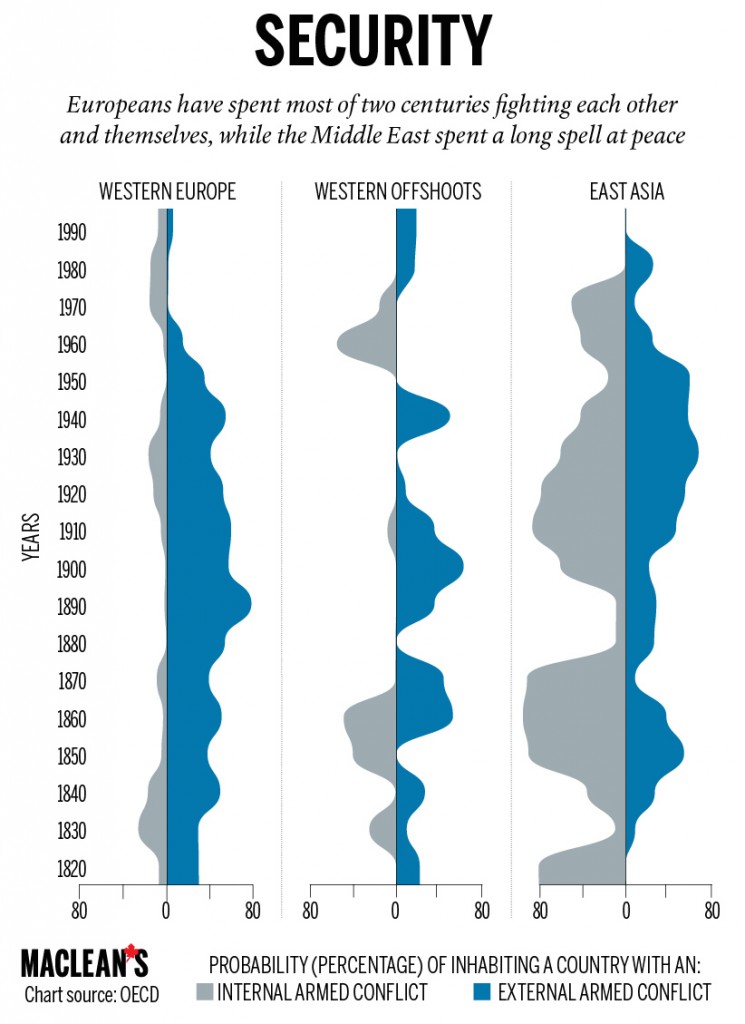
Richer, smarter, taller: A measure of Canada from the OECD

OECD-11-745x1024 - ConflictsInteresting long-term study by the OECD on the last 200 years. Not quite as captivating as the Rosling videos (200-years-that-changed-the-world-bbc), but some of the graphics are clever and well-done:

In 1820, the OECD says, Canada’s GDP per capita stood at $904—behind Western European nations, but not bad for a colonial backwater that was governed from an ocean away. That mark doubled to $1,816 by 1880, doubled again by 1920, and surpassed the colonial powers by mid-century. Meanwhile, Canadians always stood taller than even the richest nations. We averaged heights of more than 170 cm in 1820, a mark the OECD attributes to the “abundant food supply” afforded to settlers in our corner of the New World. That’s 11 cm taller than the average Mexican. The Swedes and Dutch have since surpassed Canada, but we’re still taller, on average, than Americans and every non-European country. We’ve also steadily grown older. Fifty-eight years might seem like a short life now, but in the 1920s that average Canadian life expectancy was among the world’s longest. These days, our 80-year average is only slightly behind the Japanese at 82.

It’s not all good news for Canadians. We’re among the highest per-capita emissions belchers in the world, trailing only the United States and Australia. No one else comes close. Most European countries are reducing their emissions per capita, and Russia’s world-leading numbers plummeted after the Soviet Union’s collapse.

The OECD report also tells magnificent and tragic stories about the rest of the world. It charts a massive global spike in education levels. It explains how much longer human beings live now than just a few decades ago, even if war- and disease-ravaged African nations are the glaring exception. It maps the spread of women’s suffrage, a basic political right almost unheard of in 1913 but now the global rule—except in Saudi Arabia. As the world fights for a better lot in life, the OECD makes one thing clear: the average Canadian has always had more money in their pocket, a better view in a crowd, and more schooling than most of humanity.

Richer, smarter, taller: A measure of Canada from the OECD.

Cancer survivors income falls $5K a year, StatsCan finds

Not surprising, and mirrors my experience, although I benefitted from good government employee benefits that helped those with catastrophic illness (the government planning to roll these back).

While in the end, my particularly aggressive form of cancer made returning to work a non-starter, most people following cancer diagnosis and treatment of any kind also tend to shift their priorities towards family and friends, with career advancement becoming secondary.

While I wouldn’t go so far as the Canadian Cancer Society – we often make choices between income and other priorities – there is need to examine whether we have the right balance between benefits for those with catastrophic illness and the overall cost to governments and employers:

On average, cancer survivors earned $5,079, or 12.1 per cent, less one year after diagnosis than their counterparts who were never diagnosed with the disease. Cancer lowered the probability of working in the first year after diagnosis by three percentage points on average compared with the other group in the sample.

The effects continued but lessened in the second and third years after diagnosis.

Employees may work fewer hours after cancer treatment as they recover. Others may switch jobs to something less stressful and perhaps lower paying.

“We find cancer patients are forced into situations where they have to choose between their treatment or their income, and thats not acceptable,” said Lauren Dobson-Hughes of the Canadian Cancer Society.

The society would like to see an increase in sickness benefits beyond 15 weeks and an increase in the amount thats provided beyond 55 per cent of salary. Theres also currently a two-week waiting period for EI, which Dobson-Hughes said isnt sustainable for many patients.

Cancer survivors income falls $5K a year, StatsCan finds – Health – CBC News.

Security agencies condemn use of encryption on iPhone 6

One of the unintended consequences of NSA over-reach in scooping up so much data. Another reason to buy an iPhone?

Apple declined to comment. But officials inside the intelligence agencies, while letting the FBI make the public protests, say they fear the company’s move is the first of several new technologies that are clearly designed to defeat not only the NSA, but any court orders to turn over information to intelligence agencies. They liken Apple’s move to the early days of Swiss banking, when secret accounts were set up precisely to allow national laws to be evaded.

“Terrorists will figure this out,” along with savvy criminals and paranoid dictators, one senior official predicted, and keep their data just on the iPhone 6. Another said, “It’s like taking out an ad that says, ‘Here’s how to avoid surveillance – even legal surveillance.’”

The move raises a critical issue, the intelligence officials say: Who decides what kind of data the government can access? Until now, those decisions have largely been a matter for Congress, which passed the Communications Assistance to for Law Enforcement Act in 1994, requiring telecommunications companies to build into their systems an ability to carry out a wiretap order if presented with one. But despite intense debate about whether it should be expanded to cover email and other content, it has not been updated, and it does not cover content contained in a smartphone.

Inside Apple and Google, company executives say the U.S. government brought these changes on itself. The revelations by former NSA contractor Edward J. Snowden not only killed recent efforts to expand the law, it made nations around the world suspicious that every piece of American hardware and software – from phones to servers made by Cisco Systems – have “back doors” for U.S. intelligence agencies and law enforcement.

Surviving in the global marketplace – especially in places like China, Brazil and Germany – depends on convincing consumers that their data is secure.

Security agencies condemn use of encryption on iPhone 6 – The Globe and Mail.

9 Rules For Emailing From Google Exec Eric Schmidt | TIME

Good working tips:

  1. Respond quickly
  2. When writing an email, every word matters, and useless prose doesn’t. Be crisp in your delivery.
  3. Clean out your inbox constantly.
  4. Handle email in LIFO order (Last In First Out). Sometimes the older stuff gets taken care of by someone else.
  5. Remember, you’re a router. When you get a note with useful information, consider who else would find it useful.
  6. When you use the bcc (blind copy) feature, ask yourself why. The answer is almost always that you are trying to hide something, which is counterproductive and potentially knavish in a transparent culture.
  7. Don’t yell. If you need to yell, do it in person. It is FAR TOO EASY to do it electronically.
  8. Make it easy to follow up on requests. When you send a note to someone with an action item that you want to track, copy yourself, then label the note “follow up.”
  9. Help your future self search for stuff. If you get something you think you may want to recall later, forward it to yourself along with a few keywords that describe its content.

9 Rules For Emailing From Google Exec Eric Schmidt | TIME.

The Franco-American Flophouse: Tribes and Truth

Great addition by Victoria Ferauge to the four points of Rosling (see How Not to Be Ignorant of the World):

I would add one that I call for want of a better term Tribes Never Tell the Truth.

We are social creatures and every human group family, tribe, clan, class, country, nation, state we belong to has a story about itself and about the people and places beyond its boundaries and borders. Arjun Appadurai put it quite well when he pointed out that “No modern nation, however benign its political system and however eloquent its public voices may be about the virtues of tolerance, multiculturalism, and inclusion, is free of the idea that its national sovereignty is built on some sort of ethnic genius.”

These stories contain facts mixed with myths to form powerful narratives and we cannot help but evaluate the input we get from the world against the storyline of whatever group we identify with. Even the most independent of thinkers can find himself struggling mightily to incorporate information that challenges what he thinks he already knows about the world.   Those who are quick to recognize this about religion or nationalism should acknowledge that there are quasi-religious narratives lurking under the surface of their “rationality”.

As Mircea Eliade said:”Mythical behaviour can be recognized in the obsession with success that is so characteristic of modern society and that expresses an obscure wish to transcend the limits of the human condition;  in the exodus to Suburbia, in which we can detect the nostalgia for primordial perfection;  in the paraphenalia and emotional intensity that characterize what has been called the cult of the sacred automobile.”

These stories are another impediment to seeing the world clearly because challenging them and finding them wanting gets us kicked out of a club we desperately wish to belong to.  Most groups even ones comprised of “free thinkers” do not tolerate even small deviations from the common story.  Is it not true that perceived apostates are treated even more harshly then those who are clearly in the camp of the enemy?  Every group has its own Inquisition, ready to ferret out those who “belong without believing.”

So I would add this heuristic to the list – one that was beautifully expressed by the late Christopher Hitchens –  “How do I know that I know this, except that I’ve always been taught this and never heard anything else? How sure am I of my own views? Dont take refuge in the false security of consensus, and the feeling that whatever you think you’re bound to be OK, because you’re in the safely moral majority.”

The Franco-American Flophouse: Tribes and Truth.

How not to be ignorant about the world

For those interested in data and cognitive biases, this TED video by Hans and Ola Rosling on ignorance and cognitive bias worth watching. The four general “rules” to follow when faced with uncertainty:

  1. Things are generally getting better;
  2. Assume the majority situation is in the middle;
  3. Social progress precedes economic progress; and,
  4. Sharks kill few (we exaggerate risk)

Worth watching (19 minutes)

Glenn Gould In Rapture : Krulwich Wonders… : NPR

For fans of Glenn Gould (I do a lot of my writing listening to him), a great little article and video of him at work (3 minutes):

Whats going on here, I can only guess, but here’s what you’re about to see: In the video below, the great musician Glenn Gould, supreme interpreter of Bach, is sitting at his living room piano on a low, low chair, his nose close to the keys. He’s at his Canadian country house in his bathrobe.

Through the window, you catch snatches of his back yard. It’s a windy day and he’s got a coffee cup sitting on the piano top. He’s working on a Bach partita, not just playing it, but singing along in his swinging baritone. As he plays, he gets so totally, totally lost in the music that suddenly 1:57 from the top, smack in the middle of a passage, with no warning, for no apparent reason, his left hand flips up, touches his head; he stands up, and walks in what looks like a trance to the window. Theres an eerie silence. Then, in the quiet, you hear the Bach leaking out of him. He’s still playing it, but in his head, he’s scatting the beats. Then he turns, wanders back, sits down, and his fingers pick up right where his voice left off, but now with new energy, like hes found a switch and switched it.

Glenn Gould In Rapture : Krulwich Wonders… : NPR.

Steve Jobs Was a Low-Tech Parent – NYTimes.com

Nice counterpoint article to the unveiling of iPhone 6 and Apple watch.

We were more liberal on tech and kids than most of the tech entrepreneurs:

When Steve Jobs was running Apple, he was known to call journalists to either pat them on the back for a recent article or, more often than not, explain how they got it wrong. I was on the receiving end of a few of those calls. But nothing shocked me more than something Mr. Jobs said to me in late 2010 after he had finished chewing me out for something I had written about an iPad shortcoming.

“So, your kids must love the iPad?” I asked Mr. Jobs, trying to change the subject. The company’s first tablet was just hitting the shelves. “They haven’t used it,” he told me. “We limit how much technology our kids use at home.”

….I never asked Mr. Jobs what his children did instead of using the gadgets he built, so I reached out to Walter Isaacson, the author of “Steve Jobs,” who spent a lot of time at their home.

“Every evening Steve made a point of having dinner at the big long table in their kitchen, discussing books and history and a variety of things,” he said. “No one ever pulled out an iPad or computer. The kids did not seem addicted at all to devices.”

Steve Jobs Was a Low-Tech Parent – NYTimes.com.

The secret to great presentations: its not about the software | Macworld

Good presenter advice for users of presentation software – remember the message, focus on the audience, and keep it simple:

All things being equal, simple text and images are the way to go. Text-heavy slides, complex images, cutesy animations, flashy transitions, and other such embellishments are more of a distraction than an aid. You don’t want your audience to say, “Wow, what great Keynote skills that presenter had!” You want them to remember what you said.

So I recommend choosing an uncluttered, high-contrast theme such as Gradient or Showroom in Keynote, or Twilight or Clarity in PowerPoint and, where practical, limiting each slide to a single element such as an image, graph, quote, or question. Select visuals that support, explain, or clarify what you say. They’re on the screen to help your audience understand and remember your talk, not to serve as cues or reminders of what you want to say—that’s what Presenter Notes are for in Keynote or PowerPoint. In Keynote, you may need to choose View > Show Presenter Notes to see the area at the bottom of the window where you can enter them. In either app, these notes appear on your Mac’s screen during a presentation only when your presentation is on a secondary display.

I use the Gradient theme (if it was good enough for Steve Jobs….) but find for some policy messaging hard to boil it down to three bullets (five more doable, ideally single line in large font.

The secret to great presentations: it’s not about the software | Macworld.